Most people who use Claude every day have a text file of instructions they paste in at the start of a chat: the tone to write in, the format a report should follow, the checks to run before a pull request. Skills are Anthropic's answer to that file. You write the instructions once, put them in a folder, and Claude pulls them in whenever a request calls for them.
Anthropic introduced Skills (opens in a new tab) in October 2025 and later published the format as an open standard called Agent Skills (opens in a new tab), so the same folder can work in other tools that adopt it. This guide covers what a skill is, how Claude decides when to use one, where they run, and how to write your first skill without the common mistakes.
What are Claude Skills?
A Claude Skill is a folder with one required file, SKILL.md. That file starts with a short YAML header holding a name and a description, followed by plain Markdown instructions. The folder can also hold scripts, templates and reference documents that the instructions point to.
Anthropic's Agent Skills documentation (opens in a new tab) describes them as modular capabilities that package instructions, metadata and optional resources that Claude uses automatically when relevant. The key word is automatically. You do not attach a skill to a chat the way you attach a file. Claude sees the list of installed skills and decides for itself which one fits the request.
- Instructions: the procedure, standards and examples in
SKILL.md. - Reference files: longer material such as a style guide or an API reference, read only when needed.
- Scripts: code Claude runs rather than reads, such as a validator or a file converter. Only the output enters the conversation.
- Assets: templates, fonts or sample files the task depends on.
How Claude Skills work: progressive disclosure
The reason Skills scale is that Claude does not read every skill up front. It loads them in three levels, a pattern Anthropic calls progressive disclosure.
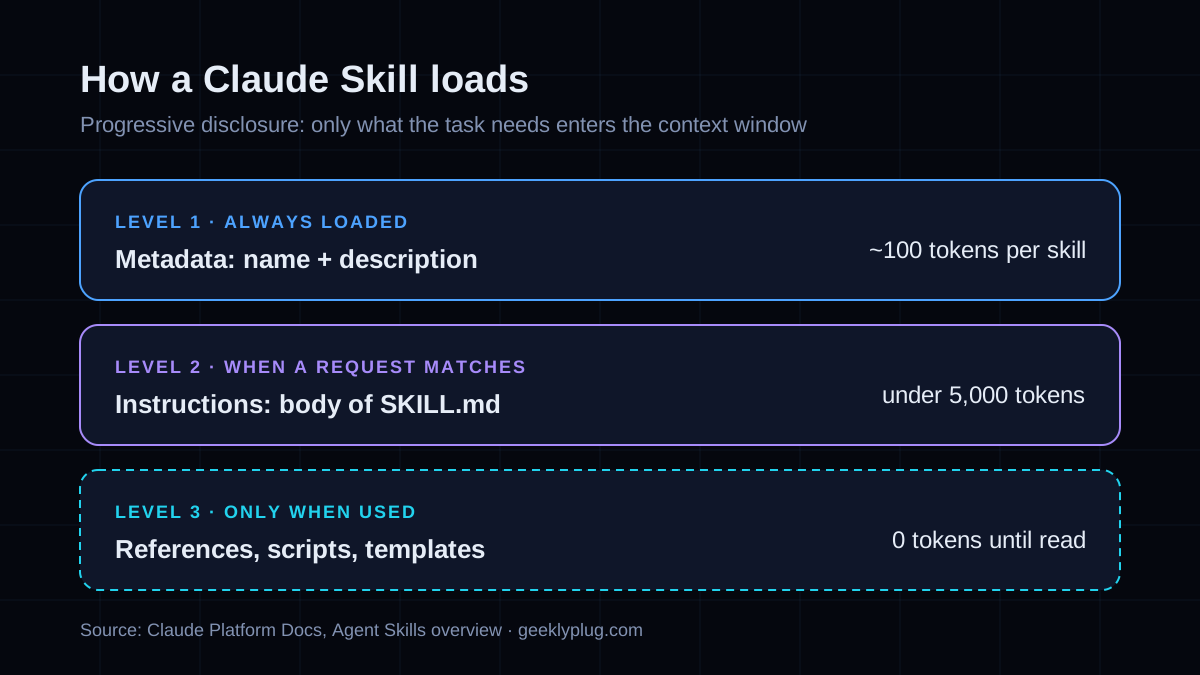
| Level | What loads | When | Approximate cost |
|---|---|---|---|
| 1. Metadata | name and description from the YAML header | Always, at the start of a session | About 100 tokens per skill |
| 2. Instructions | The body of SKILL.md | When a request matches the description | Under 5,000 tokens |
| 3. Resources | Reference files, scripts, templates | Only when the instructions call for them | Nothing until used; scripts return only their output |
This is why the description matters more than anything else in the file. It is the only part Claude sees when deciding whether to use the skill. A vague description such as "helps with documents" means the skill rarely triggers. A specific one that names the task and the words a user would type means it triggers when it should.
Where you can use Claude Skills
Skills run anywhere Claude can execute code, but each surface stores them separately. A skill you upload in the Claude app does not appear in Claude Code or the API, so plan where each one should live.
| Surface | How you add a skill | Who can use it | Good for |
|---|---|---|---|
| Claude apps (claude.ai, desktop, Cowork) | Upload a zip in Settings, under Features. Needs Pro, Max, Team or Enterprise with code execution on | The individual user who uploaded it | Writing, analysis and document workflows |
| Claude Code | Place a folder in ~/.claude/skills/ (personal) or .claude/skills/ (project) | You, or everyone who clones the repo | Engineering workflows, repo conventions |
| Claude API and Agent SDK | Upload through the /v1/skills endpoints and reference by skill_id | Everyone in the workspace | Products and automated pipelines |
How to use Claude Skills in the Claude app
- Check that code execution is enabled in your settings, since skills run inside Claude's code execution environment (opens in a new tab).
- Open Settings, then Features (or Capabilities, depending on your version), and find the Skills section.
- Toggle on any Anthropic skills you want, or upload a custom skill as a zip file with
SKILL.mdat its root. - Start a normal chat and ask for the task. You do not need to name the skill; Claude matches the request to its description.
- If the skill does not trigger, rewrite its description to include the words you actually used in the request.
How to add Skills to Claude Code
In Claude Code a skill is just a folder on disk, which makes it the fastest place to build and test one. Personal skills go in your home directory and follow you across projects. Project skills live in the repository, so the whole team gets them through version control.
~/.claude/skills/            # personal, every project on this machine
  writing-release-notes/
    SKILL.md

your-repo/.claude/skills/   # project, shared through git
  reviewing-migrations/
    SKILL.md
    checklist.md
    scripts/validate.py
According to the Claude Code skills documentation (opens in a new tab), you can also call a skill directly by typing / followed by its name, which is handy for tasks you want to trigger on purpose, such as a deploy checklist. Setting disable-model-invocation: true in the header stops Claude from running that skill on its own, so it only runs when you ask. Skills also replace the older .claude/commands/ folder, and the docs recommend skills for new work because they can carry supporting files.
How to build your first Claude Skill
Start with a task you already explain to Claude more than once a week. Here is a complete, working skill that turns rough notes into release notes in a fixed house format.
---
name: writing-release-notes
description: Turns merged pull requests, commit logs or rough notes into customer-facing release notes in the house format. Use when the user asks for release notes, a changelog entry or a "what's new" summary.
---

# Writing release notes

## Format
1. One-line summary of the release, under 20 words.
2. Sections in this order: New, Improved, Fixed. Omit empty sections.
3. Each item: what changed, then why it matters to the customer.

## Rules
- Write for customers, not engineers. No ticket numbers or file names.
- Use plain verbs: "added", "fixed", "made faster".
- If an item is internal only, leave it out and list it at the end
  under "Skipped (internal)" so the user can check.

## Example
**Fixed**
- Exports no longer time out on reports with more than 10,000 rows,
  so large accounts can download their data in one step.
Write the description like a trigger, not a label
Anthropic's skill authoring best practices (opens in a new tab) set two rules for the description: say what the skill does and say when to use it, and write in the third person. The name can be up to 64 characters of lowercase letters, numbers and hyphens, and cannot contain the words "anthropic" or "claude". The description can be up to 1,024 characters. A gerund name such as writing-release-notes or analyzing-spreadsheets reads clearly in a list.
Keep SKILL.md lean and move detail into files
Keep the body of SKILL.md under 500 lines. Claude is already capable, so explain only what it would not know: your format, your thresholds, your edge cases. Put long material in separate files one level down, such as reference.md or examples.md, and link to them from SKILL.md. Avoid chains where one reference file points to another, because Claude may preview a file rather than read it in full.
Match the freedom to how fragile the task is
For judgment tasks such as a code review, give principles and let Claude adapt. For fragile tasks such as a database migration, give an exact script and tell Claude to run it rather than rewrite it. Anthropic calls this choosing the degree of freedom, and getting it wrong in either direction is the most common reason a skill underperforms.
Test it on real requests before you share it
- Run three real tasks without the skill and note where Claude falls short. Those gaps are what the skill should fix.
- Run the same three tasks with the skill and compare.
- Try phrasing the request the way a colleague would. If the skill does not trigger, add their words to the description.
- If your team uses more than one model, test on each. A lighter model may need more explicit steps than a larger one.
Claude Skills examples worth copying
The best skills encode something specific to you that Claude cannot guess. These are the patterns we see working most often.
| Skill | What it contains | Why it works as a skill |
|---|---|---|
| Brand voice | Tone rules, banned phrases, three before-and-after rewrites | Applies to every piece of writing without being asked |
| Content brief | Brief template, keyword rules, word-count targets per section | Same structure every time, so briefs are comparable |
| Code review | Team checklist, severity levels, examples of past bugs | Consistent reviews across reviewers and repos |
| Spreadsheet reporting | Column definitions, a Python script that validates totals | The script catches errors the model might miss |
| Meeting notes | Output format for decisions, owners and dates | Turns any transcript into the same actionable shape |
Anthropic also publishes example skills in its public skills repository on GitHub (opens in a new tab), including the document skills mentioned above. They are the best reference for structure, because they show how a real skill splits instructions, references and scripts.
Claude Skills vs MCP, projects and prompts
Skills overlap with several other Claude features, and choosing the wrong one is a common source of frustration. The short version: prompts are for this conversation, projects are for this body of knowledge, the Model Context Protocol (MCP) (opens in a new tab) is for access to other systems, and skills are for a way of working.
| Feature | What it gives Claude | Loads | Use it when |
|---|---|---|---|
| Prompt | Instructions for one task | Every time you paste it | The task is a one-off |
| Project | A shared set of documents and instructions | In every chat inside the project | Many chats need the same background files |
| MCP server | Tools and live data from another system | Tool definitions at start, data on call | Claude needs to read or write somewhere else |
| Skill | A procedure, plus optional scripts | Only when a request matches | You repeat the same task across many chats |
Skills and MCP are complementary rather than competing. An MCP server might give Claude access to your analytics platform, and a skill tells it which reports to pull, which numbers matter and how to present them. If you are still writing the same long prompt every day, our guide to Claude prompt engineering covers how to make that prompt good enough to turn into a skill.
Security: treat a skill like installed software
A skill can include code that Claude runs, which means a malicious skill can direct Claude to do things that do not match its stated purpose. Anthropic's guidance is to use skills only from trusted sources, meaning ones you wrote or ones from Anthropic, and to audit every file in a third-party skill before installing it.
- Read every script, not just
SKILL.md. Instructions can look harmless while a script does something else. - Be most careful with skills that fetch content from URLs, since that content can change after you review it.
- Do not put API keys or passwords in a skill folder. Anyone you share the skill with gets them.
- Note that on the API, skills are not covered by zero data retention arrangements, according to Anthropic's documentation.
The best Claude Skills to start with
If you are new to skills, start with the four Anthropic document skills, since they are already built and show you what good output looks like. Then write one custom skill for the task you repeat most. For most teams that is a writing voice or a report format, because those are the instructions people paste most often and get the most inconsistent results from.
Skills also change the cost picture for teams running Claude at volume. Because unused skills cost almost nothing, you can give a small, fast model a precise procedure and keep larger models for work that needs them, the same logic we cover in how small language models cut inference costs. More guides like this sit in our AI section.