Most bad Claude output traces back to a prompt that made sense to the person writing it and nobody else. Claude's current models are trained to follow instructions precisely, which means they do what you asked rather than what you meant. That is good news: the fix is usually a clearer prompt, not a better model.
This guide pulls together the techniques in Anthropic's own prompting best practices (opens in a new tab) with what we have seen work in daily use. Each technique is short enough to apply today, and the templates further down are ready to copy.
What makes prompting Claude different
Older chat models rewarded tricks: magic phrases, threats, elaborate personas. Current Claude models respond best to the same things a capable new colleague would need. Anthropic's golden rule is a useful test: show your prompt to a colleague with minimal context on the task and ask them to follow it. If they would be confused, Claude will be too.
Two consequences follow. First, if you want Claude to go beyond the literal request, you have to say so. Second, adjectives like "good" or "detailed" do little work on their own. Numbers, examples and reasons do.
The anatomy of a good Claude prompt
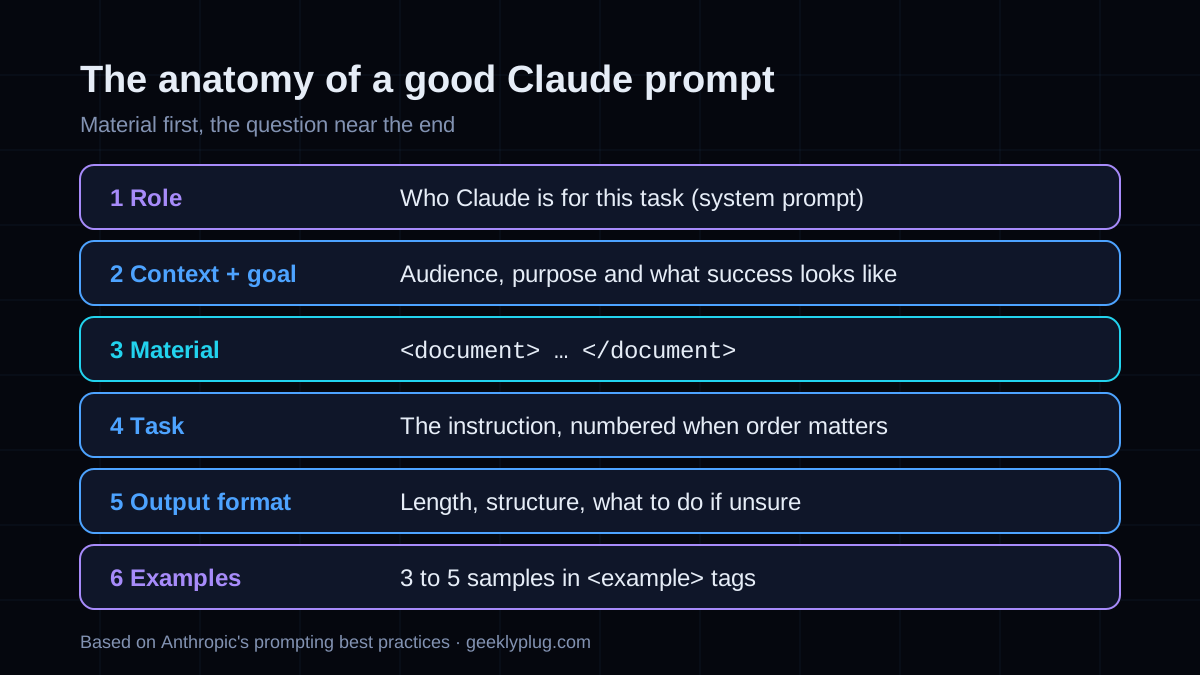
- Role: one sentence on who Claude is for this task. Best placed in the system prompt.
- Context and goal: who the output is for, what it will be used for, and what success looks like.
- Material: documents, data or code, each wrapped in its own XML tag.
- Task: the specific instruction, with numbered steps when order matters.
- Output format: length, structure, and what to do when information is missing.
- Examples: three to five samples of good output, wrapped in
<example>tags.
10 Claude prompt engineering best practices
1. Be explicit about the result you want
Anthropic's own prompt engineering guide (opens in a new tab) contrasts "Create an analytics dashboard" with a version that adds "Include as many relevant features and interactions as possible. Go beyond the basics to create a fully-featured implementation." The second prompt gets a far richer result, because it states the ambition instead of hoping for it. Tell Claude the length, the depth and the audience you have in mind.
2. Explain why, not just what
A rule with a reason generalizes; a bare rule does not. "Never use ellipses" works only for ellipses. "This will be read aloud by a text-to-speech engine, so never use ellipses because it cannot pronounce them" also nudges Claude away from other things a speech engine would stumble on. When you catch yourself writing a rule, add the sentence that explains it.
3. Separate instructions from material with XML tags
When a prompt mixes instructions, a pasted document and examples, Claude has to guess where one ends and the next begins. XML tags remove the guesswork. There are no special tag names that Claude was trained on, so use descriptive ones and keep them consistent, then refer to them by name: "Using the contract in <contract> tags...".
<document source="q3-board-report.pdf">
  {{REPORT_TEXT}}
</document>

<instructions>
Summarize the three biggest risks in the report for a new board member.
For each risk, quote the sentence it comes from.
</instructions>
4. Put long documents first and the question last
For prompts with long inputs, place the documents at the top and your instructions and question at the bottom. Anthropic reports that putting the query at the end can improve response quality by up to 30 percent in its tests, especially with complex, multi-document inputs. When there are several documents, wrap each in its own <document> tag with a <source> so Claude can cite which one it used.
5. Show three to five examples
Examples are one of the most reliable ways to steer format, tone and structure. Anthropic recommends three to five for best results. Make them relevant to the real task, varied enough that Claude does not copy one too closely, and wrap them in <example> tags so they are not mistaken for instructions.
6. Give Claude a role in the system prompt
A single sentence such as "You are a senior financial analyst reviewing statements for a skeptical CFO" shifts vocabulary, depth and what Claude treats as important. Keep the role in the system prompt and the task in the user message, so the role applies to every turn without being repeated.
7. Say what to do instead of what not to do
"Do not use Markdown" tells Claude what to avoid but not what to produce. "Write in smoothly flowing prose paragraphs" gives it a target. The style of your prompt also leaks into the answer: a prompt full of bullet points tends to get bullet points back, so write the prompt in the format you want to receive.
8. Ask for quotes before analysis
On long documents, ask Claude to first pull the relevant passages into <quotes> tags and then answer using only those quotes. This keeps the answer grounded in the text, makes it easy to check, and cuts down on confident claims the document does not support.
9. Give Claude permission to say it does not know
A model asked for an answer will try to produce one. Adding "If the information is not in the documents, say so rather than guessing" is one of the cheapest ways to reduce made-up detail. For research tasks, also ask Claude to mark how confident it is in each claim.
10. Chain prompts for complex work
A single prompt that researches, outlines, drafts and edits will do each step worse than four prompts that do one step each. Split complex work into stages and pass each stage's output into the next in tags. It is also easier to debug: when the result is wrong, you can see which stage went wrong.
Before and after: rewriting a weak prompt
Here is a typical first attempt, followed by the same request rewritten with the techniques above. Nothing in the second version is clever. It simply answers the questions Claude would otherwise have to guess.
Write a blog post about remote work productivity tips. Make it engaging.You are an editor at a publication for small-business owners.
<context>
Readers run teams of 5 to 50 people and have just moved to hybrid work.
They want ideas they can apply this week, not theory. The post supports
our free meeting-agenda template, so mention it once near the end.
</context>
<research>
{{SURVEY_FINDINGS}}
</research>
<instructions>
Write a 900-word post with 5 productivity practices drawn from the
research above. For each: a subheading, why it works (cite the finding),
and one concrete first step. Open with the single most surprising
finding. If the research does not support a practice, leave it out.
</instructions>
<example>
{{A PAST POST WHOSE TONE YOU WANT TO MATCH}}
</example>The rewrite is longer, but every line removes a guess: who the readers are, what they need, which facts to use, how long to go, and what the post is for. That is the whole of Claude prompt engineering in one example.
Claude prompt templates you can copy
Replace the text in double braces. Each template follows the structure above, so it is easy to adapt to your own tasks.
Research summary prompt
<documents>
  <document source="{{SOURCE_1}}">{{TEXT_1}}</document>
  <document source="{{SOURCE_2}}">{{TEXT_2}}</document>
</documents>

I am preparing a briefing for {{AUDIENCE}} who will use it to {{DECISION}}.

1. Extract the passages relevant to {{QUESTION}} into <quotes> tags,
   noting the source of each.
2. Using only those quotes, write a summary of no more than 250 words.
3. List anything the documents do not answer under "Open questions".

If the documents disagree, say which source says what.
Writing in your voice prompt
Write a {{FORMAT}} about {{TOPIC}} for {{AUDIENCE}}.

The goal is {{GOAL}}. Readers are {{READER_CONTEXT}}, so avoid jargon
and explain any term a newcomer would not know.

Match the voice of these samples. Copy the rhythm and tone, not the content.
<example>{{SAMPLE_1}}</example>
<example>{{SAMPLE_2}}</example>
<example>{{SAMPLE_3}}</example>

Length: about {{WORDS}} words. Use short paragraphs and plain verbs.
Code review prompt
You are reviewing a pull request for a team that values
readability over cleverness.

<diff>
{{DIFF}}
</diff>

Review for, in this order: correctness bugs, security issues,
missing tests, then readability. For each finding give the file and
line, the problem, and a concrete fix. Mark each as blocking or
optional. If you find nothing blocking, say so plainly.
Data extraction to JSON prompt
<invoice>
{{INVOICE_TEXT}}
</invoice>

Extract the fields below and return only valid JSON matching this shape:
{"vendor": string, "invoice_number": string, "date": "YYYY-MM-DD",
 "total": number, "currency": string, "line_items": [{"description":
 string, "amount": number}]}

Use null for any field that is not present. Do not infer values.
Writing a Claude system prompt
The system prompt is where you set everything that should hold for the whole conversation. Keep it to role, audience, tone, standing rules and the format you want by default. Task details belong in the user message, where they can change from turn to turn.
You are {{ROLE}} helping {{AUDIENCE}} with {{DOMAIN}}.

Your answers will be used to {{USE}}, so accuracy matters more than speed.
Write in plain English at the level of {{READING_LEVEL}}.
When you are unsure, say so and explain what would settle it.
Default format: a one-sentence answer, then supporting detail.
If you work with Claude through tools and agents, the same guidance applies with one addition: be explicit about whether you want action or advice. Anthropic notes that "Can you suggest some changes?" tends to get suggestions, while "Change this function to improve its performance" gets the change made.
Tools that write Claude prompts for you
You do not have to start from a blank page. Anthropic's Claude Console includes prompting tools (opens in a new tab): a prompt generator that turns a task description into a structured first draft, and a prompt improver that rewrites an existing prompt with clearer structure, XML tags and step-by-step reasoning. Treat both as a starting point, then test the result on real inputs.
You can also ask Claude itself: paste your prompt and ask it to identify anything a colleague would find ambiguous, then rewrite it. That single step catches most missing context. If you want to practice, Anthropic's free interactive prompt engineering tutorial (opens in a new tab) walks through these techniques in nine chapters with exercises.
Prompt, project or skill: when to stop prompting
If you paste the same prompt more than a few times a week, it has outgrown being a prompt. Background documents that many chats need belong in a project. A repeatable procedure, such as a report format or a review checklist, belongs in a skill, which Claude loads automatically when a request matches. Our guide to what Claude Skills are and how to build one walks through turning a prompt like the templates above into a skill.
Common Claude prompting mistakes
| Mistake | What happens | Fix |
|---|---|---|
| Vague quality words ("make it good") | Generic, middle-of-the-road output | State length, audience and one example of good |
| Rules without reasons | Claude follows the letter, misses the intent | Add one sentence on why the rule exists |
| Question above a long document | Weaker answers on long inputs | Put the documents first and the question last |
| One example only | Output copies the example too closely | Give three to five varied examples |
| Everything in one prompt | Each step done a little worse | Chain prompts, one stage each |
| Relying on prefill for format | Errors on newer models | Describe the format or use structured outputs (opens in a new tab) |
Clear prompts also save money. A precise prompt often lets a smaller, cheaper model do work you assumed needed the largest one, which is the approach we cover in how small language models cut inference costs. Browse the rest of our AI guides for more.